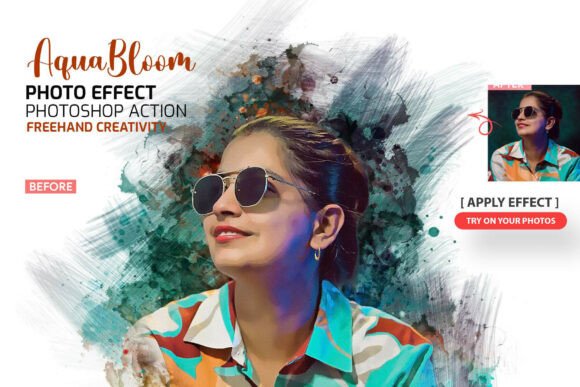
AquaBloom Watercolor PS Action: Integrating Authentic Artistry into Digital Workflows
The intersection of traditional media aesthetics and digital efficiency has long been a challenge for graphic designers and photographers. While digital tools offer speed, they often lack the organic unpredictability of physical paint. The AquaBloom Watercolor Photoshop Action addresses this specific gap by bridging the divide between algorithmic processing and hand-crafted artistry. Unlike standard filters that apply a uniform texture overlay, this tool utilizes original brush stock to reconstruct images with the fluid dynamics of real watercolor. For professionals and hobbyists alike, understanding the technical composition and practical application of this asset is essential for integrating it effectively into high-end editorial, portrait, and commercial projects without sacrificing authenticity.
The Technical Distinction Between Filters and Brush-Based Actions
To fully leverage the AquaBloom Watercolor PS Action, one must understand how it differs from conventional photo effects. Standard watercolor filters typically use displacement maps and blur algorithms to distort pixels, resulting in a smeared appearance that lacks pigment density variation. In contrast, AquaBloom operates as a generative action set. It references a library of 100 original, hand-crafted watercolor brushes stored in the accompanying .ABR file. When the action runs, it does not merely distort the existing image; it applies these brush assets in layers, mimicking the way water and pigment interact on paper.
This distinction is critical for maintaining image integrity during enlargement. Because the effect relies on high-resolution brush stamps rather than pixel manipulation, the resulting artwork retains edge definition and color vibrancy. The inclusion of a dedicated Photoshop Pattern File (.PAT) further enhances this realism by providing paper texture data that interacts with the blend modes of the brush layers. This technical foundation ensures that the output resembles a scanned physical painting rather than a digital imitation, satisfying the rigorous quality standards required for print production and large-format display.
Workflow Integration and Asset Management
Efficiency in creative workflows depends heavily on organization and ease of use. The AquaBloom package is structured to minimize friction during the installation and execution phases. The core component is the .ATN action file, which automates the complex layering process. However, the true value lies in the non-destructive nature of the output. Upon running the action, users are presented with fully separated and organized layers rather than a flattened raster image.
This layer architecture provides total creative control, allowing for post-action adjustments that are impossible with flat filters. Users can toggle visibility on specific bloom layers, adjust opacity to control pigment saturation, or mask out areas where the effect obscures important facial features in portraiture. The system also includes a border management layer. Depending on the project requirements, the decorative border style can be shown or hidden instantly. This flexibility makes the asset suitable for diverse deliverables, from Instagram posts requiring clean edges to fine art prints benefiting from a stylized frame. Furthermore, the ability to export directly as a Transparent PNG or PSD ensures compatibility with broader design ecosystems, including InDesign layouts and web development environments.
Strategic Applications Across Creative Disciplines
The versatility of the AquaBloom Watercolor Photoshop Action extends beyond simple photo editing. Its realistic rendering capabilities make it a strategic asset across multiple industries and creative niches. Understanding these specific use cases helps creators maximize the return on investment for this tool.
- Portrait and Wedding Photography: In the competitive wedding market, differentiation is key. Photographers can use AquaBloom to create heirloom-quality album covers or wall art that stands apart from standard glossy prints. The action’s handling of skin tones preserves warmth while adding an ethereal, painterly quality that flatters subjects. Because the brushes are hand-crafted, no two conversions look identical, ensuring each client receives a unique piece of art.
- Fashion and Editorial Design: Magazine spreads and lookbooks often require visual variety to maintain reader engagement. Applying a watercolor effect to select fashion shots introduces a tactile contrast against sharp typography and clean layout grids. The action handles fabric textures exceptionally well, translating silk and lace into fluid washes of color that emphasize movement and mood over literal detail.
- Product Packaging and Branding: For brands emphasizing organic, artisanal, or eco-friendly values, watercolor aesthetics communicate these attributes visually. Designers can transform product photography into soft, approachable imagery for packaging labels or social media campaigns. The included border styles add a vintage or boutique feel that aligns with heritage branding strategies.
- Educational and Children’s Media: Illustrators and educators creating content for younger audiences benefit from the soft, non-threatening aesthetic of watercolor. The action allows for the rapid conversion of reference photos into storybook-style illustrations, significantly reducing the time required to produce custom visual assets for textbooks, worksheets, or animated backgrounds.
Navigating the Learning Curve and Support Resources
Despite the "one-click" marketing associated with many Photoshop actions, achieving professional results with AquaBloom requires a nuanced understanding of source material and adjustment. Not every photograph converts equally well; images with strong contrast and defined subjects generally yield superior results compared to low-contrast or noisy files. Recognizing this, the developers have included comprehensive support resources to bridge the knowledge gap.
The package contains a detailed help file and a dedicated video tutorial. These resources are not merely promotional but serve as technical documentation for optimal usage. The video walkthrough demonstrates proper image preparation, including resolution requirements and color profile recommendations. It also covers troubleshooting common issues, such as excessive bleeding in highlight areas or insufficient detail in shadow regions. For users new to Photoshop actions, the tutorial explains how to load .ATN, .ABR, and .PAT files correctly, preventing common installation errors. Investing time in reviewing these materials transforms the user experience from trial-and-error to a predictable, repeatable workflow.
Evaluating Authenticity in Digital Art Assets
In an era saturated with AI-generated imagery and automated filters, the demand for authentic, human-centric design elements has increased. AquaBloom’s reliance on original hand-crafted brush stock positions it uniquely in this landscape. Each brush in the 100-piece set was created using traditional media before being digitized, capturing the irregularities, dry bristle marks, and wet-on-wet blooms that define genuine watercolor painting.
This authenticity matters for both aesthetic and ethical reasons in professional design. Clients increasingly seek visuals that feel tangible and human-made, particularly in sectors like wellness, education, and luxury goods. By utilizing tools rooted in traditional craftsmanship, designers can deliver work that resonates emotionally with audiences fatigued by synthetic perfection. Moreover, the organized layer structure respects the designer's role as an artist rather than just an operator. The tool facilitates creativity rather than replacing it, allowing for intentional artistic decisions regarding composition, color balance, and focal points.
Considerations for Professional Implementation
While AquaBloom offers significant advantages, successful implementation requires mindful consideration of technical constraints and project goals. High-resolution watercolor generation is computationally intensive. Users should ensure their hardware meets Adobe Photoshop’s recommended specifications for handling large brush sets and multi-layered files. Working with smart objects or lower-resolution proxies during the experimentation phase can preserve system performance before committing to final renders.
Additionally, color management plays a pivotal role in translation accuracy. Watercolor pigments behave differently in RGB versus CMYK color spaces. For print projects, it is advisable to perform test conversions in the target color space to anticipate gamut shifts. The vibrant blues and greens characteristic of digital watercolor may dull in print; proactive adjustment of the brush layers’ hue/saturation properties can mitigate this. Finally, licensing and usage rights should always be verified when incorporating third-party assets into commercial work. Ensuring compliance with Creative Fabrica’s licensing terms protects both the creator and the client from potential intellectual property disputes.
Ultimately, the AquaBloom Watercolor Photoshop Action represents a sophisticated fusion of tradition and technology. By prioritizing authentic brush mechanics over simplistic filtering, it empowers creators to produce work that honors the legacy of watercolor painting while meeting the demands of modern digital production. Whether enhancing a wedding portrait, designing editorial layouts, or crafting brand identities, this tool offers a reliable pathway to achieving the timeless beauty of hand-painted art with contemporary efficiency.