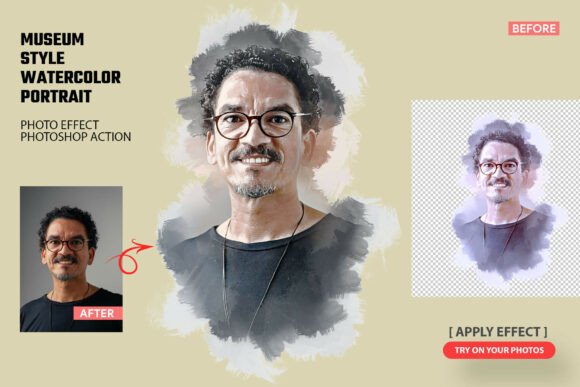
Evaluating the Museum Style Watercolor Portrait Action for Professional Workflows
Digital art automation often faces skepticism from creative professionals who prioritize authenticity and manual control. However, the Museum Style Watercolor Portrait Action represents a specific category of Photoshop tools designed to bridge the gap between rapid production and fine art aesthetics. Unlike generic filter packs that simply overlay a texture, this action attempts to reconstruct the image using algorithmic brush strokes and displacement maps that mimic traditional watercolor behavior. For photographers, designers, and content creators operating under tight deadlines, understanding the practical utility and limitations of this tool is essential before integrating it into a professional workflow.
The primary value proposition of the Museum Style Watercolor Portrait Photoshop Action is its ability to generate sophisticated, gallery-inspired visuals without requiring years of traditional painting experience. It targets a specific aesthetic niche: the delicate, translucent quality of classical museum portraiture rather than modern, high-contrast digital illustration. This distinction matters significantly for projects requiring a timeless or heritage feel, such as wedding stationery, historical editorial content, or premium branding assets.
Technical Composition and Asset Quality
To evaluate whether this action delivers on its promises, one must look beyond the marketing imagery and examine the included files. The package typically consists of two critical components: the .ATN action file and the .ABR brush library. The effectiveness of any watercolor automation relies entirely on the quality of these underlying assets.
The .ATN file serves as the automated engine. In well-constructed actions like this, the script does not merely apply a blur or noise filter. Instead, it utilizes smart filters, layer masks, and blend modes to separate tonal values and apply texture selectively. This preservation of facial detail is what separates "museum style" results from standard artistic filters. If an action destroys the eyes or mouth definition in pursuit of a painterly look, it fails as a portrait tool. The Museum Style Watercolor Portrait Action is engineered to maintain realistic facial structures while applying artistic interpretation to hair, clothing, and backgrounds.
The accompanying .ABR brush file is equally important. Authentic watercolor effects require brushes with irregular edges, varying opacity, and organic scatter patterns. Standard round brushes cannot replicate the capillary action of water on paper. The custom brushes included in this set provide the necessary texture data that the action references during processing. Users should note that these brushes also hold standalone value; even if the automated action requires tweaking for a specific image, the brush set allows for manual refinement and correction, extending the long-term utility of the purchase.
Real-World Performance and Usability
In practical application, the "one-click" claim requires nuance. While the Museum Style Watercolor Portrait Action automates the heavy lifting of texture generation and color blending, professional results usually demand post-action adjustment. No algorithm can perfectly interpret every lighting scenario or skin tone variation. Users should expect to spend additional time refining layer masks or adjusting hue/saturation levels after the initial run.
The action performs best with high-resolution source material. Watercolor textures rely on pixel density to appear organic; applying this effect to low-resolution web images often results in muddy artifacts or visible repetition patterns. For print work, wall art, or large-format posters, starting with a minimum of 300 DPI at the intended output size is non-negotiable. The action’s reliance on detailed brushwork means that higher megapixel counts translate directly to more convincing paint simulations.
Flexibility is another key performance metric. Because the action generates non-destructive layers (when used correctly), it allows for significant customization. Professionals can toggle specific texture layers on or off, adjust the intensity of the paint splashes, or modify the blending modes to suit different skin tones. This modular approach transforms the tool from a rigid preset into a foundational base for custom artwork. For users creating series-based content, such as album covers or consistent social media themes, this consistency combined with tweakability is vital for maintaining brand identity.
Ideal Use Cases and Audience Fit
Not every project benefits from automated watercolor effects. Identifying where the Museum Style Watercolor Portrait Action adds genuine value helps prevent misuse. Based on its output characteristics, this tool is particularly effective for:
- Fine Art Portraiture: Photographers looking to offer hybrid photo-painting services can use this as a starting point for client proofs or final deliverables that emulate traditional media.
- Editorial and Publishing: Magazine layouts, book covers, and blog headers often require distinctive visuals that stand out from standard stock photography. The museum aesthetic conveys sophistication and cultural depth.
- Personalized Merchandise: Creating unique gifts, greeting cards, or wall art where the emotional resonance of watercolor enhances the personal nature of the image.
- Fashion and Beauty Content: Softening commercial photography to create dreamy, ethereal campaigns that align with luxury or vintage branding.
- Portfolio Diversification: Digital artists and retouchers can expand their service offerings to include illustrative styles without investing hundreds of hours in learning traditional watercolor techniques.
Conversely, this action may not be suitable for technical illustrations, corporate headshots requiring strict realism, or graphic design projects demanding sharp vector-like precision. Understanding these boundaries ensures the tool is applied where its strengths shine brightest.
Professional Observations and Limitations
While the Museum Style Watercolor Portrait Photoshop Action streamlines complex processes, experienced users should remain aware of inherent limitations. Automation cannot fully replicate the intentionality of a human artist. Watercolor is defined by happy accidents and fluid dynamics that are difficult to code perfectly. Occasionally, the action may produce areas where paint accumulation looks unnatural or where edge transitions feel too abrupt.
This is where the included brush set becomes a critical safety net. Professionals should view the action as generating 80% of the work, leaving 20% for manual polish. Being prepared to paint over awkward transitions or enhance highlights manually is part of the workflow. Users who treat the action as a final destination rather than a powerful starting point may find themselves frustrated by minor imperfections.
Additionally, color management plays a significant role. Watercolor pigments have specific spectral qualities that RGB monitors struggle to display accurately. When preparing files for print, users must account for color space conversion. The vibrant blues and reds seen on screen may shift when translated to CMYK ink. Testing prints and calibrating workflows is necessary to ensure the "museum quality" translates from digital preview to physical artifact.
Assessing Long-Term Value and Workflow Integration
For freelancers and agencies, the return on investment for creative assets depends on time savings and output versatility. The Museum Style Watercolor Portrait Action offers substantial efficiency gains. Manually painting a convincing watercolor portrait can take days; this action reduces that timeline to minutes, plus refinement time. This speed enables volume work that would otherwise be economically unfeasible.
Beyond speed, the educational value of deconstructing the action layers should not be overlooked. By examining how the .ATN file builds the effect—how it uses gradients to drive masks, how it stacks textures, and how it handles color separation—users can learn advanced Photoshop techniques applicable to other projects. The action serves as both a production tool and a learning resource for understanding digital compositing logic.
Ultimately, the decision to adopt this tool hinges on alignment with creative goals. For those seeking to infuse their digital work with the warmth and texture of traditional fine art, the Museum Style Watercolor Portrait Action provides a reliable, high-quality foundation. It respects the intelligence of the user by offering customizable layers rather than locked-in presets, and it supports professional standards through high-resolution compatibility and authentic brush assets. When integrated thoughtfully into a broader creative workflow, it transforms ordinary portraits into evocative artworks that resonate with viewers on an emotional level, fulfilling the promise of museum-inspired digital craftsmanship.