Artistic Photo to Oil Painting Photoshop: Evaluating Automated Realism
Digital artists and photographers often seek methods to bridge the gap between photographic precision and traditional painterly aesthetics. While manual digital painting requires years of skill development, automation tools have evolved to offer credible alternatives for specific workflows. The Artistic Photo to Oil Painting Photoshop action represents a specialized utility designed to convert standard photographs into textured oil paintings through automated layer construction. Unlike basic filters that simply blur an image, this tool attempts to replicate the physical depth of paint through complex masking and texture application. For professionals managing high-volume creative output or hobbyists exploring new mediums without a steep learning curve, understanding the practical capabilities and limitations of this action is essential for determining its place in a modern production pipeline.
Beyond Basic Filters: Understanding Layer-Based Automation
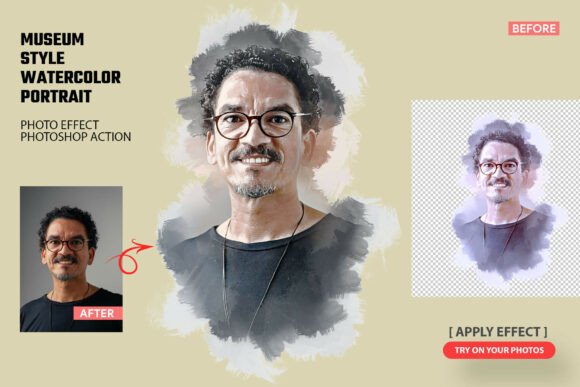
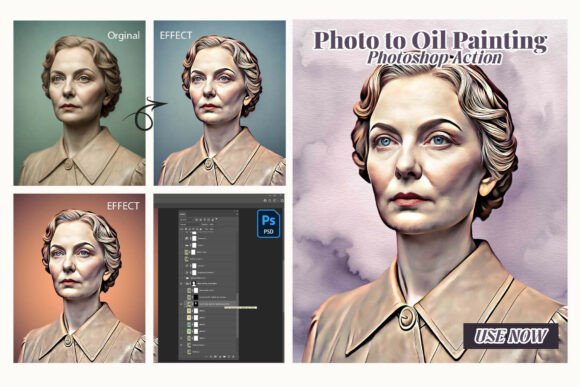
The primary distinction between the Artistic Photo to Oil Painting Photoshop action and standard artistic filters lies in its architectural approach. Most native Photoshop filters apply a destructive or flat effect that reduces image resolution and detail. In contrast, this action utilizes a non-destructive, multi-layered system. When executed, the .ATN file generates a structured stack of layers that separate color information, texture overlays, and brush stroke simulations. This construction is significant because it preserves the underlying image data while applying the artistic interpretation as adjustable components.
This layer-based methodology allows for genuine customization post-generation. Users are not locked into a single algorithmic result; they can adjust opacity, blend modes, and mask density to fine-tune the intensity of the oil effect. The inclusion of ten distinct oil painting styles within a single action further enhances utility. Rather than purchasing separate assets for impressionist, palette knife, or soft brush styles, users gain access to a versatile library. This consolidation streamlines asset management and reduces the friction associated with experimenting with different aesthetic directions during client revisions or personal projects.
Practical Workflow Integration and Efficiency
For freelancers and small business owners, time efficiency directly correlates to profitability. The "one-click" promise of this tool must be evaluated against real-world processing times and setup requirements. In testing, the action performs rapidly on standard-resolution images suitable for web and social media. However, when applied to high-megapixel RAW files intended for large-format printing, processing time increases proportionally. This is expected behavior for any script performing complex pixel manipulation, but it necessitates workflow planning. Professionals should anticipate a brief rendering period for print-ready assets, though this remains significantly faster than manual painting or iterative filter tweaking.
The integration of soft brush freehand customization addresses a common failure point in automated art generation: the lack of focal hierarchy. Algorithms typically apply effects uniformly across the canvas, which can flatten the composition. By providing dedicated brushes for refining highlights and details, the Artistic Photo to Oil Painting Photoshop action empowers users to guide the viewer’s eye manually after the automated pass. This hybrid workflow—automation for the base structure followed by manual refinement for emphasis—is where the tool delivers its highest value. It handles the tedious 80% of texture generation, allowing the artist to focus entirely on the critical 20% that defines artistic intent.
Output Quality for Sublimation and Print Media
A specific strength of this action is its optimization for physical product creation. Sublimation artists and print-on-demand sellers face unique challenges regarding color gamut, edge definition, and background transparency. Standard artistic conversions often leave jagged edges or muddy backgrounds that look unprofessional on merchandise. The inclusion of transparent PNG mask support specifically targets this pain point. By generating clean alpha channels, the action facilitates easy placement of painted subjects onto mugs, t-shirts, and canvases without requiring extensive rotoscoping.
Furthermore, the bundled oil texture backgrounds serve a dual purpose. Aesthetically, they add cohesive grain that unifies the composite. Practically, they help mask compression artifacts or noise that may become visible during the sublimation transfer process. The textures are designed to withstand CMYK conversion better than synthetic digital noise, resulting in more natural-looking prints. For educators and content creators producing course materials or blog imagery, these high-quality outputs ensure that digital representations accurately reflect the tactile nature of traditional media, maintaining credibility with audiences who value authenticity.
Evaluating Realism and Texture Depth
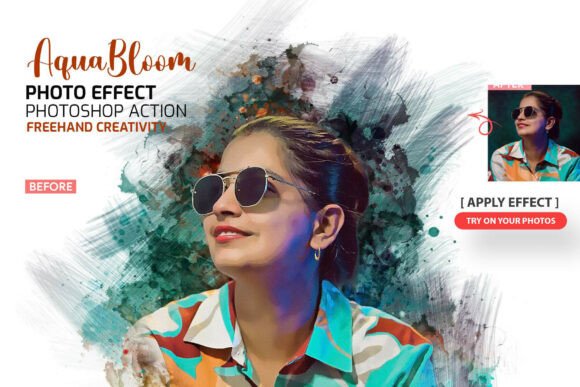
Realism in digital oil painting is defined by light interaction and surface irregularity. Flat overlays fail to convince because they lack directional consistency. The Artistic Photo to Oil Painting Photoshop action addresses this through advanced layer construction that simulates brush directionality relative to image contours. While no algorithm perfectly replicates human decision-making, the generated strokes generally follow logical flow lines rather than random noise patterns. This contributes to a more convincing illusion of hand-painted work, particularly when viewed at standard display sizes.
However, users should manage expectations regarding extreme close-up inspection. At 100% zoom on a 4K monitor, repetitive patterns inherent to procedural generation may become apparent. This is a limitation of current automation technology rather than a defect specific to this product. For most commercial applications—including book covers, editorial illustrations, and wall art—the viewing distance renders these micro-patterns invisible. The tool excels at delivering perceptual realism rather than forensic accuracy, which aligns with the needs of its target demographic.
Restoration and Creative Enhancement of Legacy Photos
An often-overlooked application of this action is the restoration and enhancement of old photographs. Vintage images frequently suffer from fading, scratches, and low resolution. Converting these images to oil paintings can effectively mask imperfections while adding emotional warmth. The realistic background options included with the action provide contextual environments that may be missing from damaged originals. Instead of attempting a technically impossible perfect restoration, creatives can reimagine family archives as artistic portraits.
This use case demonstrates the tool’s flexibility beyond pure aesthetic conversion. It serves as a problem-solving utility for genealogists, historians, and families seeking to preserve memories in a format that feels timeless rather than clinical. The ability to toggle between realistic and stylized interpretations allows users to honor the original subject matter while adapting it for contemporary display preferences. This versatility extends the return on investment for users who might initially purchase the action solely for commercial design work.
Considerations for Professional Adoption
While the Artistic Photo to Oil Painting Photoshop action offers substantial benefits, prospective users should consider several factors before integration. First, familiarity with Photoshop layers and masks is prerequisite. Although marketed as beginner-friendly, maximizing the tool’s potential requires understanding how to navigate the generated layer stack. Users uncomfortable with non-destructive editing may find the initial output sufficient but will miss opportunities for refinement that distinguish professional work from generic presets.
Second, style consistency across a series requires manual calibration. Because the action responds to image contrast and color variance, two photos with different lighting conditions may yield slightly different textural densities. Maintaining visual cohesion in a gallery show or branded campaign involves using the customization brushes to normalize results. This is not a drawback but rather a characteristic of responsive tools; acknowledging it prevents frustration during batch processing.
Finally, licensing and usage rights should always be verified for commercial projects. While the action itself is a tool, ensuring compliance with platform terms for AI-assisted or automated art is increasingly important for publishers and marketers. Transparent disclosure of workflow methods builds trust with audiences and clients who value ethical creative practices.
Final Assessment of Value and Utility
The Artistic Photo to Oil Painting Photoshop action occupies a valuable niche between simple filters and labor-intensive digital painting. Its strength lies not in replacing human artistry, but in accelerating the technical aspects of texture creation and style application. For sublimation businesses, it solves specific production bottlenecks related to transparency and print quality. For photographers and designers, it provides a reliable starting point for mixed-media exploration. The combination of automated efficiency with manual override capability makes it a pragmatic choice for professionals who need consistent, high-quality artistic effects without sacrificing creative control. When used with an understanding of its architectural logic and output characteristics, it proves to be a dependable asset in the modern digital imaging toolkit.